
Dinkey Dongle has reached end-of-life. Existing users should migrate to Dinkey Pro as soon as possible.
Support for Dinkey Pro and Dinkey FD can be found here.
| Browse By Category: | Look Up Error Number: | Search: |
Glossary | Contact Us |
The drivers for Dinkey 1S, Dinkey 2 and Dinkey Net dongles are incompatible with the Memory Integrity feature of Windows 10 and newer. These dongles are end-of-life and no further driver updates will be provided.
Symptoms
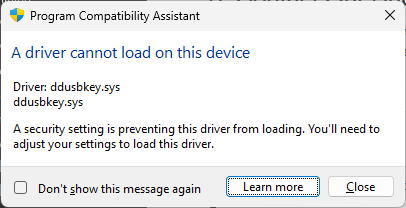
1. Program Compatibility Assistant reports that it cannot load the drivers usbkey.sys or ddusbkey.sys:
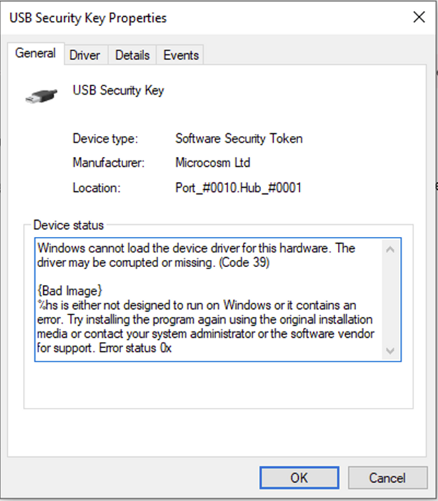
2. Device Manager reports the following error when accessing the dongle:
3. The SetupAPI log file C:\Windows\inf\setupapi.dev.log contains entries like the following:
Device has problem: 0x27 (CM_PROB_DRIVER_FAILED_LOAD), problem status: 0xc000007b
Solution
To disable Memory Integrity, navigate to Windows Security > Device Security > Core Isolation, then set Memory Integrity to Off. If Core Isolation is not listed in Device Security then it is not available on your computer and is not the cause of your driver issue.
If you are the user of software that requires a Dinkey dongle, contact the software vendor for further support.
If you are the developer of Dinkey-protected software, you should migrate to Dinkey Pro as soon as possible. Dinkey Pro dongles use drivers that are built in to Windows and are unaffected by this issue.
If this article did not help you to solve your problem, please use the menu at the top of the page to browse or search more articles, or to contact our support team.


