
Dinkey Dongle has reached end-of-life. Existing users should migrate to Dinkey Pro as soon as possible.
Support for Dinkey Pro and Dinkey FD can be found here.
| Browse By Category: | Look Up Error Number: | Search: |
Glossary | Contact Us |
Some drivers for Dinkey 1S, Dinkey 2 and Dinkey Net dongles are incompatible with the Windows driver policy, beginning with the April 2026 Windows security update. This issue affects drivers installed by the Setupdrv installation utility. A new setupdrv64 utility was released in June 2026 that installs compatible drivers on 64-bit Windows 10 and newer. setupdrv64 is available in our Download Centre.
Compatible drivers are not available for 32-bit Windows 10 or affected versions of Windows Server. The rest of this article provides more information for users of those platforms.
Detailed information about the Windows Driver Policy is provided by Microsoft here: https://support.microsoft.com/en-us/windows/the-windows-driver-policy-ecd2a78c-750c-415d-93f2-e37302ce0443.
Symptoms
1. Windows Security reports that usbkey.sys or ddusbkey.sys has been blocked:
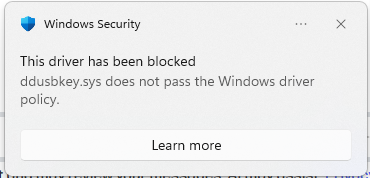
2. The Code Integrity event logs contain events with IDs 3076 or 3077. To view this event log, open Event Viewer and navigate to Applications and Services Logs > Microsoft > Windows > CodeIntegrity > Operational.
Solution
See How do I turn off the Windows Driver Policy? in Microsoft's documentation.
Prevention
To prevent compatibility issues caused by blocking drivers, the Windows Driver policy is not actively enforced until certain criteria are met. This means that the Dinkey drivers will not be blocked as long as they are used often—for example, daily.
A very simple way to ensure that the Dinkey drivers are loaded and used to access a Dinkey dongle regularly is to run DDLook each time the computer is started. See Configure startup applications from File Explorer in this Microsoft support article for instructions.
If you are the user of software that requires a Dinkey dongle, contact the software vendor for further support.
If you are the developer of Dinkey-protected software, you should migrate to Dinkey Pro as soon as possible. Dinkey Pro dongles use drivers that are built in to Windows and are unaffected by this issue.
If this article did not help you to solve your problem, please use the menu at the top of the page to browse or search more articles, or to contact our support team.


